The TMP set is covered with what I'd call Colegraphs, as designed by Lee Cole, who did the instrumentation and a lot of the signage for the film. The TMP set is probably unique in that at least SOME though was given to what the controls were or would actually be. The weapons console is the only one we get any good look at (in TMP and TWOK), but you can see that there's some thought given to how it works.
EDIT:
A while while I was helping to graphics for Starship Exeter I analyzed the TMP weapons console so that I could make sure the Exeter's defense station had some instrument commonality (like and antecedent) to TMP, and in the process created diagrams of the weapons and defense screens from TMP.
Here they are:
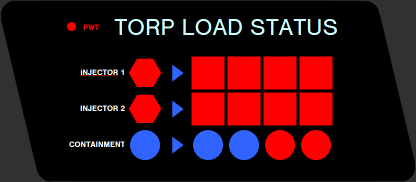
Diagram of TORP LOAD STATUS display. The red and blue indicators light up as the sliders are pushed up on the PHOTON TORPEDO panel. (In TWOK they pulled them DOWN, which actually shuts off the console above.)
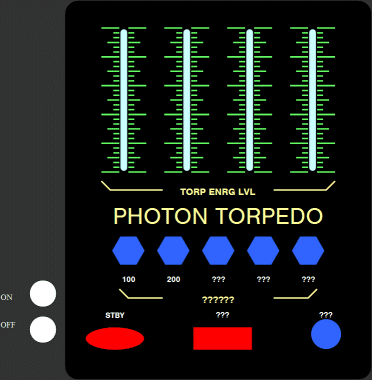
Diagram of PHOTON TORPEDO arming controls. At top are four sliders for setting the torpedo energy levels. Some of the labeling is not clearly visible and thus indicated by ???. The ON and OFF buttons were practical switches on the console face, painted black, that allowed the actor to turn on this part of the console.
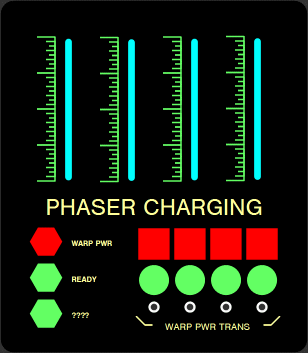
Diagram of PHASER CHARGING controls. At top are four sliders for setting the power levels, and at bottom right are four mechanical push buttons for transferring warp power.
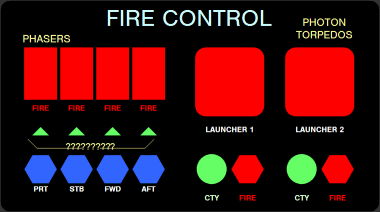
Diagram of FIRE CONTROL controls. At top left are buttons for firing phasers in the indicated direction, and at lower right are hexagonal buttons for firing torpedoes. One of the labels is not clearly visible and thus indicated by ???
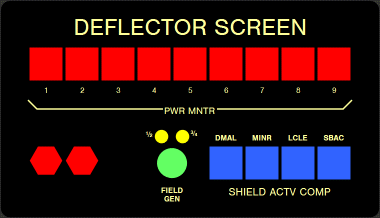
Diagram of DEFLECTOR SCREEN controls. The labels for the square blue lights appear to be in jokes for the art department, with DMAL for Dan Maltese, MINR for Mike Minor, LCLE for Lee Cole and SBAC for Rick Sternbach. The text labels for the hexagonal buttons at lower right are not clearly visible in and references found to date.
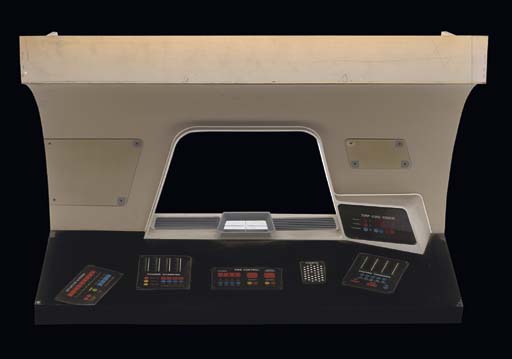
Finally, here's a photo of half-scale console built for insert shots of graphics appearing on the large display (center). You can see how the various panels fit on it. I didn't boither drawing up the COMPTR pannel